DakaGoaAudio Instruments for Goa trance

VST3 + AU · Windows · macOS · Linux · €15 one-time

GOA SYNTH Everything a Goa trance track needs in one window.

A polyphonic virtual-analog synthesizer built specifically for psychedelic trance: TB-303 squelch, seven-voice supersaws, hoover stabs, FM bleeps and PWM pads — with a tempo-locked trancegate, a rolling arp sequencer, OTT multiband squeeze and an AI patch designer right in the header — offline by default, or your own Gemini/OpenAI key.

  • €15one-time licence
  • 175factory presets
  • 150+automatable params
  • 24 hfull trial, no account
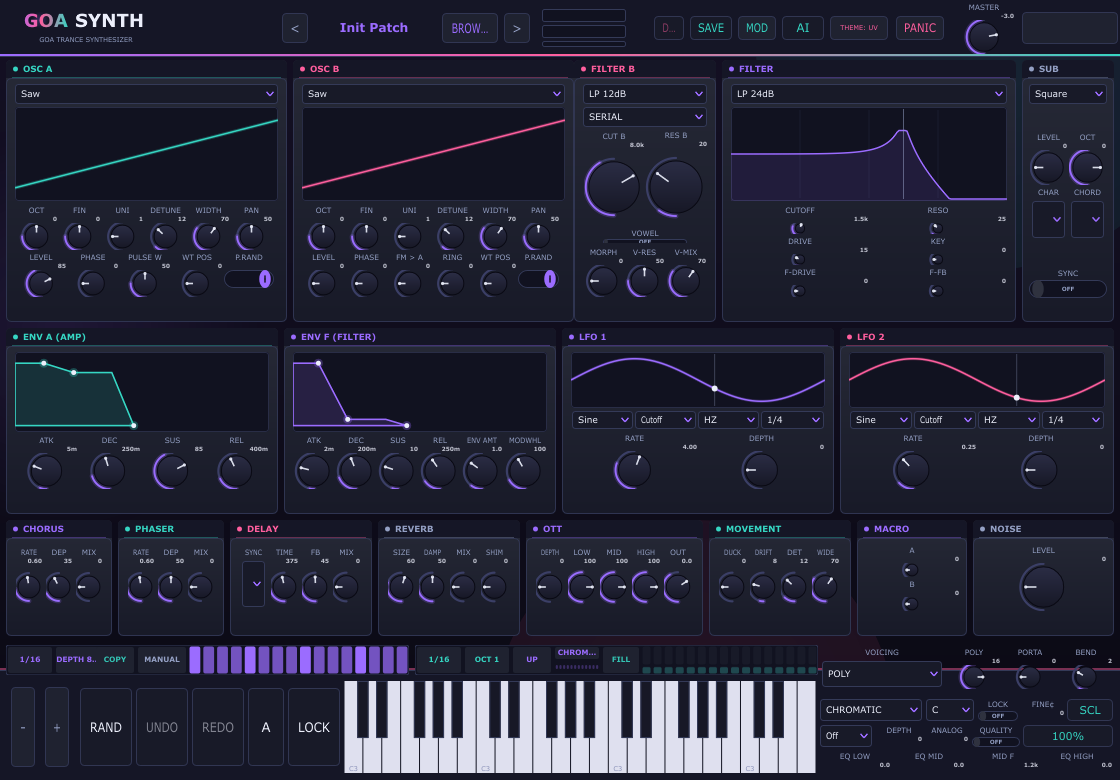
The GoaSynth interface: a header with the preset name, output meter and master knob, oscillator A and B panels with drawn waveforms plus pulse width, sync and ring mod, filter and filter B, the sub oscillator with its SYNC switch, amp and filter envelopes, two LFOs, chorus, phaser, delay, reverb, OTT, movement, macro, noise and EQ panels, trancegate and arp strips, randomise / undo / redo / A-B / lock buttons and the on-screen keyboard.
The full interface — UV GOA skin, three panel rows and the gate, arp and keyboard strips.

Release notes

What's new in 1.6.0 4 October 2026

  • Fixed Loud passages no longer clip: the master limiter's final stage was a hard clipper at full scale, so anything hot patches pushed past it — full OTT squeeze, runaway delay feedback, MASTER at +6 — came out with squared-off, crackling peaks. The same loudness curve now ends in a true peak rider (instant attack, 80 ms release) with a soft-clip safety, holding −0.5 dB cleanly.
  • Added The update-available dialog also shows the new version's release date and the installer's file size.
  • Changed The update-available dialog's download link goes straight to the new version's installer (GoaSynth-Setup-<version>.exe, attached to its GitHub release) instead of the product site.

Download 1.6.0ZIP package·Installer·SHA-256 checksums·all files

What's new in 1.5.0 2 October 2026

The update dialog tells you what changed: release notes now travel in the version feed the plugin already fetches, and a View full change log link opens them in the browser.

  • Added The update dialogs carry a View full change log link: update-available lands on the new version's own notes, up-to-date opens the release notes.
  • Added The update-available dialog shows What's new — the release notes ride along in the version feed the plugin already fetches.

What's new in 1.4.0 2 October 2026

A small, sharp release: the MENU gained Change Log, Check for updates always answers, and the About card is closable.

  • Added MENU gained Change Log — opens the release notes on the website.
  • Fixed Check for updates no longer fails silently: every outcome — feed unreachable, update available, up to date — answers with a dialog over the plugin window, so no host can bury it.
  • Fixed The About card has a close button you can actually see (✕ on the card's own corner), and clicking the darkened backdrop dismisses it.

What's new in 1.3.0 1 October 2026

  • Changed The FILTER panel was rearranged into a 3×2 knob grid (CUTOFF / RESO / KEY over DRIVE / F-DRIVE / F-FB) with evenly normalized gaps — bigger knobs, no cramped rows.

What's new in 1.2.0 30 September 2026

This update is about housekeeping you can feel: a header MENU with an About card and an update check.

  • Added A MENU dropdown in the header: About shows the running version, your licence state and machine ID (one click to copy), and Check for updates fetches a tiny version feed once — anonymous, no account, no telemetry. Offline? It says so.

What's new in 1.1.0 28 September 2026

The largest update the instrument has had.

  • Added The trancegate gained the classic step contours: SQUARE, SMOOTH, SAW and TRIANGLE shapes with ramp-smoothed step edges.
  • Added Arp timing rebuilt on absolute sample times: per-step gate length, no truncated note-offs, STRUM keeps its stagger at small buffers.
  • Added True stereo metering with peak-hold ticks; NOISE gained a White / Pink choice.
  • Added Oscillator hard sync and ring mod, manual pulse width, a three-band master EQ, and filter B / vowel / OTT / pump as modulation destinations.
  • Added Undo / A/B / randomise / lock, WAV drag-and-drop wavetable slicing, editor size and zoom remembered.
  • Added The bank grew to 175 patches with a rebuilt browser (favourites, search, sort, audition).
  • Added NEON, PAPER and OLED themes, 100–200 % zoom, active-step glow.
  • Added Factory bank exposed to the DAW's program list, arp MIDI-out, AU/AUv3 and LV2 builds, and licence/trial polish.

1.1.0 — the details

⣿

Four trancegate step shapes

The gate strip gained a SHAPE cell beside its steps: the hard SQUARE chop it always had, plus SMOOTH (half-cosine), SAW (instant in, linear fall) and TRIANGLE (sine rise, sine fall) — the contours the genre is built on. Step edges are ramp-smoothed, so the boundary between two steps stops clicking.

⇅

Arp timing, rebuilt

Note-offs are parked with absolute sample times and delivered by the block that contains them, instead of being clamped into the block that fired the note-on. A gate longer than one buffer is no longer truncated, and the STRUM fan keeps its 18 ms stagger at small buffer sizes. Every step has its own gate length (5–100 %, 75 % by default), and accents hold their gate longer as well as hitting harder.

▤

True stereo metering

The header meter now shows real per-channel peaks with peak-hold ticks — held for about 1.2 s, then falling at roughly 12 dB/s, the way a DAW meter behaves — instead of one gain-reduction strip, so you can see both sides of the image.

◍

Pink noise, and a tidier voice

NOISE gained a White / Pink choice: white for brightness, hats and transients; pink for the −3 dB/oct tilt that reads as cymbal wash, air, wind and sea. Pink is a decorrelated Paul Kellet 7-pole pair — one filter per channel — so it stays stereo.

◇

More synth, straight into the matrix

Inter-oscillator hard sync and ring mod, manual pulse width, and a three-band master EQ (low shelf, peaking mid, high shelf) with true bypass — and filter B cutoff and resonance, vowel morph, analog character, OTT depth and pump depth are all modulation destinations, so the deeper parts of the engine move like the rest of it.

⇄

Undo, A/B, randomise, lock

A 32-step snapshot stack behind UNDO / REDO, two slots behind A/B, one-button RAND with musically bounded draws, and LOCK to keep the knobs you already like through all three. Drop a WAV on an oscillator and it is sliced into wavetable frames. Editor size, zoom and skin are remembered for next time.

◈

175 patches, and a browser to find them

The bank grew from 135 to 175 patches across nine families, and the browser was rebuilt around it: favourites that persist, AND search over names and tags, sort by A-Z / Z-A / newest / bank order, click to audition, double-click to load, and a right-click menu to rename, duplicate, delete or reveal.

✦

Three new themes, and zoom

NEON (cyan and hot magenta on black), PAPER (a real light mode) and OLED (pure black, one red accent) join UV Goa, steel and warm analog, and the whole interface zooms from 100 % to 200 % from the header or with Ctrl + scroll. The active step glows as it plays.

⌗

Into the host, and a licence that travels

The factory bank is exposed to your DAW's program list, the arp can send its notes out as MIDI to record or drive another instrument, and this release adds AU / AUv3 on macOS and LV2 on Linux next to VST3. A pasted serial tolerates cosmetic dashes, .goalicense files carry the buyer's name, and an instance whose 24-hour trial runs out mid-session locks itself instead of waiting for a repaint.

Verify your download

Every build is fingerprinted as it is packaged, and the same numbers are published in downloads/SHA256SUMS.txt. Check them before you install: if a hash does not match the file you were sent, that file was damaged or replaced in transit, and support would rather hear about it than not.

Version
1.6.0
Built
04 October 2026 at 01:27, from commit fbc9a38
Download
GoaSynth-1.6.0-win64.zip — 12.2 MB
ZIP SHA-256
f6e639b4f88c440d252fa5d18c87fd782b88344354d67c7f13fa24e4375e7ac9
Setup SHA-256
5df94f2fa677f5a381884ef6b2ae2a6fc17200fa31c73a0017344314d7b40eba — the GoaSynth-Setup-1.6.0.exe installer inside the ZIP, 22,939,648 bytes
Standalone SHA-256
9dd5ef0b272f2492081ac6ac58da43024861e6ed444a01b6c1b040decf4e2ecf — the GoaSynth.exe installed next to the plugin, 8,831,488 bytes — verify it after installing

Windows: Get-FileHash .\GoaSynth-1.5.0-win64.zip -Algorithm SHA256. macOS and Linux: sha256sum -c SHA256SUMS.txt in the folder you downloaded to. The Setup hash is over the GoaSynth-Setup-1.5.0.exe inside the ZIP — the installer that puts the plugin and the standalone app in place.

Overview

Designed around the genres it serves

No ten-page manual for basic sounds. Everything is on one surface: the two oscillators, both filters and the sub across the top, the envelopes and LFOs beneath them, the FX row under that, and the sequencers, scale quantiser, pump and keyboard along the bottom — with the depth you don't need yet behind a single MOD button.

◍

Two oscillators, drawn or classic

Saw, square, PWM, triangle, sine — or sketch your own 8-frame wavetable right in the display, or drop in a WAV and let it slice the file into frames. Up to seven detuned unison voices around both oscillators, plus sub, noise and analog drift, and inter-oscillator FM, hard sync and ring mod.

◇

Two filters, three routings

12/24 dB lowpass, highpass, bandpass and notch, with a second independent filter that can run in serial, parallel or stereo split.

⣿

Trancegate that never drifts

16 steps from 1/32 to 1/4, sample-accurate and phase-locked to the host bar. Classic UPLIFT, off-beat and roller shapes are one click away.

⇅

Arp with per-step velocity

A programmed semitone run with 0–3 octave range, five playback directions and an accent bar on every step for pumping off-beat dynamics.

◎

OTT on the output

The psy secret weapon: a three-band upward/downward compressor with 220 Hz / 2 kHz fourth-order crossovers and per-band trims.

✦

AI patch designer

Type "dark rolling acid bass" and get a playable patch instantly — and a different one every time you press generate. Offline by default, or point it at Gemini, OpenAI or your own local LLM with your own key.

⌗

Scales and microtuning

Nine scale tables — Phrygian, harmonic and Hungarian minor, double harmonic and more — keep a rolling arp in key, and LOCK applies the same quantiser to your own playing. Load a Scala .scl file for anything from a 432 Hz reference to a 19-tone scale.

◧

Pump without the wiring

A host-synced sidechain pump ducks the output on the beat division you choose, so the synth sits under a kick with no sidechain bus, no extra mixer channel and nothing to route.

◈

Character, all the way in

A morphing vowel bank, tape wow and flutter, filter feedback that screams, a three-band master EQ, and a QUALITY switch that renders the oscillators and filters at 2× oversampling. Every one of them is off until you ask for it.

⇄

Undo, A/B and one-button randomise

RAND builds a new patch from the current one with musically bounded draws; UNDO / REDO step back through every preset load, randomise and knob move; A/B keeps two versions of a sound to flip between; LOCK protects the knobs you already like from all three.

▤

Metering and host integration

A stereo output meter with peak-hold ticks beside the master knob, a trancegate with four step-edge shapes beyond the hard gate (smooth, saw, triangle), an arp with per-step gate length and a strum mode that fans held chords, the whole factory bank exposed to your DAW's program list, and an arp that can send its notes out as MIDI to record or feed another instrument.

Pricing

One price. The whole instrument.

GoaSynth is a paid plugin: €15, once — no subscription, no tiers, no preset store. That covers the built VST3 for Windows, macOS and Linux, the complete 175-preset factory bank, every effect and sequencer in this page, and all updates for the whole 1.x line. Download it first and use it free for 24 hours — full features, no account, nothing to cancel.

Full licence

€15one-time · VAT included where applicable

Personal licence for one user. Everything is in the box — there is no "pro" version waiting behind another payment.

  • A 24-hour full trial to try it before you pay — every feature, no account
  • VST3 builds for Windows, macOS and Linux — the same engine on all three, plus AU / AUv3 for Logic on macOS and LV2 on Linux
  • A licence serial signed for your machine, delivered as a .goalicense file. One serial per computer, three machines per licence, activated fully offline
  • 175 factory presets across nine families, plus the AI patch designer (offline by default, or your own Gemini / OpenAI key)
  • Every feature on this page: dual drawing oscillators, two filters with SERIAL / PARALLEL / SPLIT, 8-slot mod matrix, full FX chain with OTT, trancegate and arp sequencers
  • All six skins and the animated swirl background
  • Commercial use — releases, live sets, client work and sample packs, with no royalties
  • Free updates for the entire 1.x line
  • 14-day refund, no questions asked

Card, Apple Pay and PayPal are handled by our checkout provider, who acts as merchant of record — they process the payment, issue the receipt and look after VAT, and we never see or store your card details. Prices are shown in euros; the receipt and download link arrive by email within a minute of payment.

Store checkout is still being set up, so orders are taken by email for now: download the trial build, copy your machine ID from the activation screen, and write to us with it. You'll get a proper invoice (card, bank transfer or PayPal) plus your serial and the download link — usually the same day. The licence, the 14-day refund and everything else on this page apply exactly as written.

The checkout is being wired up right now. The licence is €15 one-time, the terms below are final, and refunds run for 14 days — nothing about the offer is still in flux, only the payment page.

Checkout asks for your machine ID — the 20-character code on the plugin's activation screen, with a copy button beside it — because that is the machine your serial is signed for. Install the build first and it is already there, along with your 24-hour trial.

What happens after you order

  1. Install the build first — no purchase needed. GoaSynth starts with a 24-hour full trial, and the activation screen already shows your machine ID (20 characters, one copy button).
  2. Checkout asks for that machine ID. It is what your serial gets signed against, so one serial unlocks one computer — keys can't be shared around, and nothing is ever checked against a server.
  3. Your receipt arrives by email with the download page for the Windows, macOS and Linux builds, and we send a .goalicense file signed for your machine — double-click it, or press IMPORT on the activation screen, and the plugin unlocks for good.
  4. Keep that email. It is your re-download link, your order reference and your proof of licence — there is no account to log into.

Not a customer? Build it from source

The source is public under the AGPLv3, so if you have a compiler and an afternoon you can build GoaSynth for nothing — that is a deliberate choice, not a loophole. The licence gate comes with the code, though: a fresh checkout carries a placeholder key header that rejects every serial, so a self-build means running the keygen's --init once to create your own keypair and rebuilding. Anyone may do that under the AGPLv3. What you're paying for is the finished thing: tested builds for three platforms, the preset bank, updates, and a person to email when a DAW misbehaves.

Who it's for

Producers making psy-trance, Goa, acid, forest and full-on — and anyone who wants 303 squelch, supersaws and a tempo-locked gate without wiring six plugins together. If your mixer already sounds the way you want, you still only need one window to get there.

Not sure it fits your setup? Ask first — a question costs nothing. A full refund is available for 14 days after purchase.

Sound engine

Oscillators, wavetable drawing & voice architecture

Each voice runs two full oscillators, a sub and white noise, with a unison stack of up to seven detuned voices around both oscillators — all band-limited so a scream stays a scream, not an alias.

Oscillator A / B

  • Waves: Saw, Square, PWM, Triangle, Sine — or a user-drawn wavetable
  • Octave ±2 and fine detune ±50 cents
  • Level and independent pan per oscillator
  • Start phase 0–360° plus phase randomisation for wide, non-identical stacks
  • FM: oscillator B phase-modulates oscillator A — metallic, bell and vocal formants from a single knob

Wavetable morphing & drawing

  • 8 frames per oscillator. Pick a frame in the strip under the display and sketch it: left-drag draws, right-drag erases, double-click resets.
  • WT POS sweeps the table with linear frame interpolation; the other frames show as ghost outlines and the display previews the live morphed output.
  • Edit tools on each oscillator: SMOOTH (blur), FLIP (polarity), NORM (re-level) and the P25 / P50 / FORMANT / SPIKES shape generators.
  • Transforms remove DC and normalise, so even scratchy doodles play at full level.
  • Both LFOs can target WT POS A and WT POS B for evolving spectral movement.

Filtering

Screaming 303 resonance, two filters deep

Filter A

  • Types: LP 12 dB, LP 24 dB, HP 12 dB, BP 12 dB, Notch — TPT state-variable
  • Cutoff 20 Hz – 20 kHz with resonance, drive and key tracking
  • Filter envelope amount ±5 octaves, drawn on a draggable graph

Filter B + routing

An independent second filter — its own type, cutoff and resonance — with a ROUTE selector that changes the character completely:

SERIALB follows A. The classic cascade — a 24 dB lowpass into a second stage for a steep, squelching 303 sweep.
PARALLELA and B summed 50/50. A lowpass plus a highpass becomes a band limiter; two bandpasses gives a formant notch.
SPLITA filters the left channel, B the right — wide stereo filter movement you can hear panning across the image.

Filter character

  • F-DRIVE saturates before the main filter, so a screaming resonance stays musical instead of clicking and clipping its way through the envelope
  • F-FB feeds a one-sample of the filter output back into its own input. Low settings thicken; high settings are the screech-and-scream zone psy leads live in, and it reaches self-oscillation at the top. A hard safety clamp means it can never run away on you

Vowel / formant filter

A three-formant bank sits after the main filters and morphs through AH → EH → EE → OH → OO on one knob — talking acid, vocal pads and phased hoovers with no third-party plugin in the chain.

  • VOWEL switches the bank in, MORPH walks the sequence, V-RES sharpens the formants and V-MIX blends dry against filtered
  • Both LFOs can target VOWEL, so the morph can move on its own — a slow LFO gives you vowel drift, a fast one gives you a talkbox

Modulation

Two envelopes, two LFOs, eight matrix slots

Velocity-sensitive envelopes with draggable graphs, animated LFO scopes, and a freely routable matrix for everything else.

Envelopes

Two ADSRs — amp and filter — both velocity-sensitive, both with graphs you can drag directly. Decay and sustain shape the classic acid "wow" while a long release carries a pad into the next bar.

LFOs

Sines, triangles, squares and random sample & hold. Route to Pitch, Cutoff, PWM width, Volume, WT POS A, WT POS B or the vowel morph — seven destinations each. Run free (0.02 – 20 Hz) or lock to host tempo from 1/1 down to 1/16 and 3/16 triplets.

Voicing & performance

POLY
1–16 voices with steal-free allocation
MONO
Retriggering mono for basslines
LEGATO
Glide/slide, full 303 behaviour
Glide
0–1000 ms
Bend
0–12 semitones
Extras
Mod wheel → cutoff, sustain pedal support

Matrix sources

  • LFO 1
  • LFO 2
  • Filter env
  • Amp env
  • Velocity
  • Mod wheel
  • S&H random
  • Aftertouch
  • MACRO A / B CC 14/15

Eight slots with per-slot curve (LIN / EXP / SIN) and lag (slew), plus A/B routing banks — program a second set of routings and switch the whole matrix live with the BANK B switch.

Matrix destinations

  • Cutoff ±4 oct
  • Filter B cutoff ±4 oct
  • OSC A / B fine ±1200 ct
  • OSC A / B levels
  • WT POS A / B
  • Resonance
  • Filter B resonance
  • Drive
  • Pulse width
  • Vowel morph
  • Analog character
  • OSC A / B pan
  • LFO 1 / 2 rate ±6 Hz
  • Delay time ±2 oct
  • Delay feedback
  • Delay mix
  • Phaser mix
  • Reverb size
  • Reverb mix
  • OTT depth
  • Pump depth

8 slots, free routing. Click a cell to cycle values, right-click to go backwards, drag the bipolar amount bar — negative amounts invert the response, and a slot whose source is off is inert. Everything down to OSC A / B pan is read per voice, so each voice's LFOs, envelopes, velocity and mod wheel move only that voice; the LFO-rate and FX destinations after it are global and applied once per block, which is how one row can sweep the whole instrument's delay, phaser, reverb, OTT squeeze or sidechain pump.

Effects

A complete psy-trance FX chain, pre-mixed

  1. Pump
  2. Chorus
  3. Phaser
  4. OTT
  5. Tempo delay
  6. Reverb
  7. Master
  8. Limiter

Chorus & phaser

Rate / depth / mix each. The chorus widens supersaws; the phaser gives a slow moving sweep behind acid lines.

Tempo-synced ping-pong delay

Off, 1/16, 1/8 dotted, 1/8, 1/4 or free milliseconds. Feedback runs through a 5 kHz lowpass so repeats darken the way analog echoes do instead of turning brittle.

Reverb

Size and damping into a straightforward mix control. Long, dark tails for morning pads; barely there for tight bass. SHIM grows an octave-up pitch-shifted copy of the tail — the shimmer that hangs over a breakdown — so a held pad keeps rising after the note has stopped.

Movement & noise

Three more panels sit on the FX row. MOVEMENT gathers the analog drift amount, the unison detune and stereo width, and the FX duck in one place — the slow per-voice wander that stops a supersaw sounding like a photocopy. MACRO holds two performance knobs meant as modulation-matrix sources: MIDI CC 14 / CC 15 drive them out of the box, so a single controller sweep can move any routed destination. NOISE is the voice's white-noise level on its own knob, for hats, wind and riser beds without borrowing an oscillator. The SUB panel's CHAR cell reshapes the unison field itself (CLASSIC spread, PHASED centre bunching, HYPER widened edges) and CHORD makes single keys sound scale-snapped chords.

OTT multiband compressor

The signal is split at 220 Hz and 2 kHz with fourth-order crossovers, and each band gets the classic fast upward + downward squeeze that makes psy kickbasses and saws feel glued and loud. DEPTH blends from fully transparent to the full psy squeeze, LOW / MID / HIGH trim each band's response and OUT is an output pad.

Depth 0 is a true DSP bypass — no filter colouration when you don't want it. Every effect in the chain is a real parameter, so your DAW can automate the whole signal path.

Master EQ — low shelf, peaking mid, high shelf

A three-band EQ sits after MASTER and before the limiter, so it shapes the signal the limiter then catches rather than being re-shaped after the fact: a low shelf at 200 Hz, a peaking mid with its own frequency control (150 Hz – 6 kHz) and a high shelf at 4 kHz, each ±15 dB. It is the last thing you reach for on a finished patch — take off the mud, push the presence, keep the limiter honest.

Every band defaults to 0 dB, and an all-zero EQ is a true bypass: no coefficients are computed and no filtering happens, so a patch that ignores it cannot be coloured by it.

Sidechain pump — the kick-follow feel, with nothing to route

Set PUMP to 1/4, 1/8, 1/8T, 1/16 or 1/16T and the output ducks on that division, locked to the host transport: deepest right on the beat, then an exponential recovery until the next one. DEPTH sets how far it dips, so a nudge gives you movement and a full turn gives you the classic Goa pump. It sits on the voice output ahead of the FX, which is why the reverb tails breathe with it instead of fighting it — and why you never have to build a sidechain bus, add a mixer channel or hope your host has a kick track to trigger from. Off — sync at OFF or depth at zero — is a true bypass.

Sequencers

Trancegate and arp, locked to the transport

Two 16-step strips at the bottom of the window. Both are sample-accurate and phase-locked to the host bar — start playback mid-pattern and they're already on the right step.

Trancegate

Click or drag on the strip to toggle steps. Right-click cycles the step division, and the second cell sets chop depth. With every step on, the gate bypasses itself.

Step lengths

  • 1/32
  • 1/16
  • 1/16 dotted
  • 1/8
  • 1/8 triplet
  • 1/4

Pattern cell

  • UPLIFT 3-on / 1-off
  • OFF-BEAT house chop
  • ROLLER eighth notes
  • SLOWROCK half-time
  • 16THS full run
  • OFF+4TH swell

Left/right click cycles the shapes. Hand edit a single step and the cell flips back to MANUAL. The COPY cell mirrors the arp strip's active/rest pattern onto the gate in one click — program an arp run, get an identically gated trance chop.

Arp sequencer

A second 16-step strip plays the held note as a programmed semitone run. Each step is either a Rest or an offset from +0 to +11, with a 0–3 octave range — the classic rolling Goa arp line.

Per-step velocity

Drag the velocity bar up or down on any step; right-click toggles a full-velocity accent. The synth plays those dynamics back exactly, so off-beat accents pump the way they do in the genre.

Direction cell

  • UP
  • DOWN
  • UP-DOWN ping-pong
  • RANDOM fresh roll every step
  • CONVERGE 0-15-1-14…

Scale, root and lock

Two cells beside the strip pick a SCALE and a ROOT, and every programmed step is snapped into that scale (ties resolve downward, which is the darker, more musical choice). Turn on LOCK and the same quantiser applies to notes you play live — hold a chord and it folds into Phrygian instead of the chromatic mush your keyboard hands you.

FILL — a roll in the key you're in

One click on the FILL cell writes three to six in-scale steps into the empty positions, leaving every step you programmed alone, so a sparse pattern becomes a psy roll without you plotting sixteen cells by hand. It only ever uses notes of the current SCALE and ROOT — including the pentatonics, where that constraint is what makes a roll sound deliberate — and it deliberately skips some rests instead of filling every gap, because a roll with air in it is the sound, not a machine-gun.

The playhead cell lights up while the transport runs, so you can see exactly where you are.

Tuning

In the scale you meant, in the tuning you want

Two things most synths leave to luck: whether a rolling arp stays in key, and what "in tune" means at all. GoaSynth answers both from the controls at the bottom-right of the window — nine scale tables, a root selector, and full Scala microtuning.

Scale quantizer

Pick a table with the SCALE cell and a pitch class with ROOT. Every semitone the arp strip plays is snapped into that scale, and an out-of-scale step lands on the nearest in-scale note — ties resolve downward, which is usually the answer the ear wanted anyway. A row of twelve LEDs beside the cell shows both the mode and what your pattern does with it: in-scale degrees glow faintly, the pitch classes your enabled arp steps actually hit light up, and the root is the brightest — so you can read the shape of the scale and the shape of the line at a glance.

  • chromatic (off)
  • minor
  • Phrygian
  • harmonic minor
  • Hungarian minor
  • double harmonic
  • Dorian
  • major
  • minor pentatonic

LOCK lifts the quantiser off the arp and puts it on your playing: hold a chord and every note folds into the selected scale. With LOCK on and Hungarian minor chosen, a wrong key never lands — it simply becomes the note of the scale that sits closest to it.

Microtuning — Scala .scl

FINE¢ shifts the whole instrument by up to ±100 cents, so −32 puts you on a 432 Hz reference and everything else in the session follows. The SCL button goes further and loads a Scala .scl file: the classic text format, 2 to 64 degrees per octave, octave-wrapped and anchored on A4.

  • Accepts what real files contain — cent values (204.0), ratios (6/5) and decimal ratios (1.25), with comments and blank lines ignored
  • Any equal or unequal temperament: just intonation, 19-tone, 31-tone, gamelan tables, hand-built per-octave scales
  • The button takes the name of the loaded tuning and shows its degree count on hover; clicking again returns to 12-TET
  • Your file is copied to %APPDATA%/GoaSynth/tuning.scl and reloaded next session, so the tuning survives even if you move or delete the original
  • Tunings swap on a lock-free note table — the UI publishes, the audio thread keeps reading — so changing scale between tracks never gaps or clicks

Octave wrapping means a seven-degree file still plays every key on the keyboard: notes above its range continue the pattern instead of falling back to 12-TET.

Why this genre needs it: Goa and psy trance are built on hypnotic repetition, so one wrong step is audible by the fourth bar. Scale locks keep a wild arp in key without flattening it, and microtuning is how a lead sits against a tabla, a flute or a 432 Hz drone instead of beating against it.

AI patch designer

Describe the sound. Get a patch.

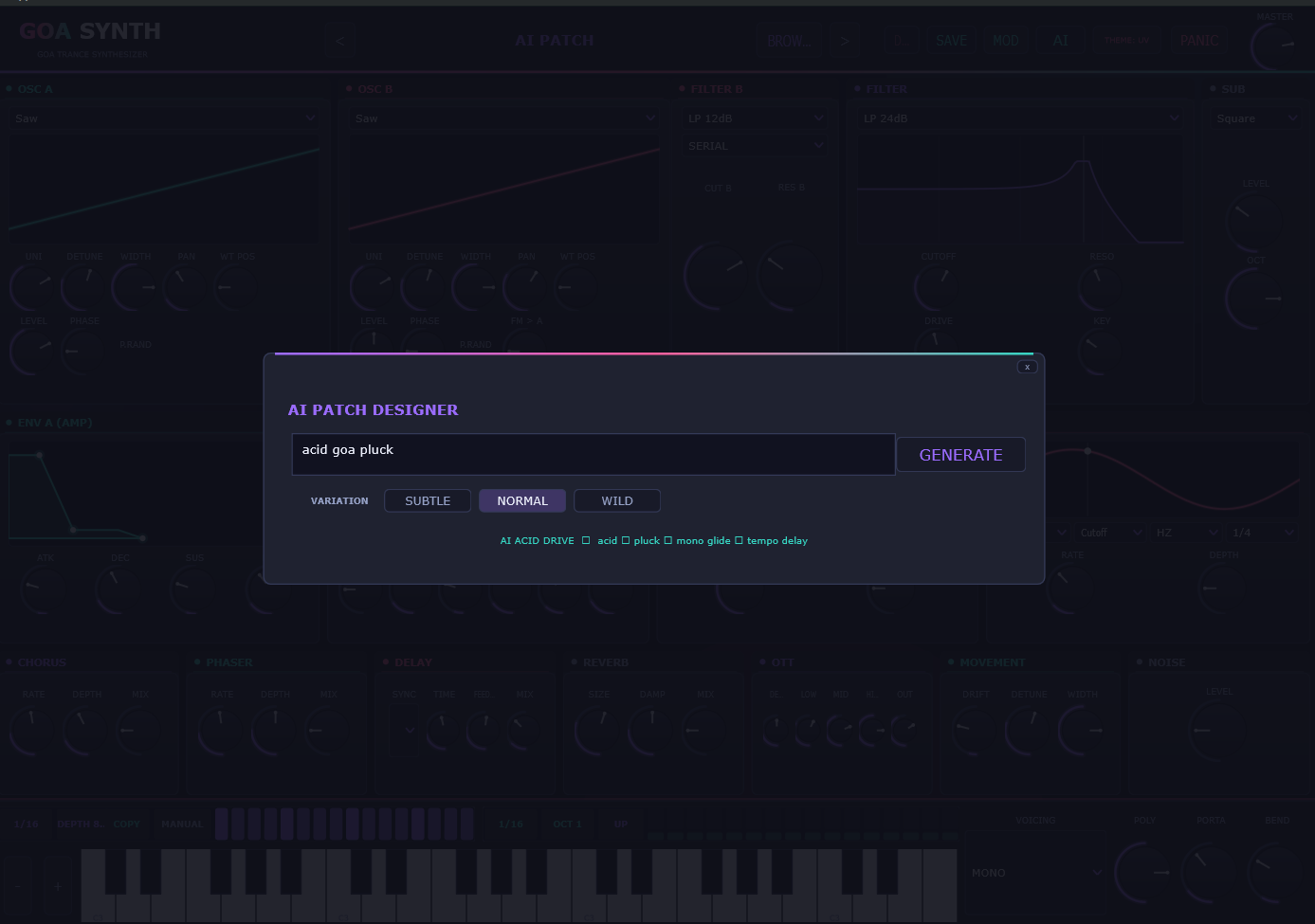
The AI PATCH screen is a vocabulary-driven designer. Families stack — "dark rolling acid bass" is the acid family plus dark and bass tweaks — then a variation pass guarantees that no two generations are identical while staying musically related.

The AI Patch Designer overlay: a prompt box containing 'acid goa pluck', a GENERATE button, SUBTLE / NORMAL / WILD variation buttons and a row of keyword chips.
Type a prompt, pick a variation, generate.

It re-rolls every time

The same prompt always yields a different but musically-related patch: waveform flavours, octave placement, unison and detune rolls, filter offset, pan spread, delay division, fresh gate and arp grooves, and humanised envelope jitter. Variant suffixes (II, NEO, PRIME…) in the title make generations easy to tell apart in the browser. Save the ones you like.

Variation strength

SUBTLEKeeps the family's core choices, lays classic grooves (3-on/1-off gate, 1/16 minor roller) and halves the jitter.
NORMALThe default free re-roll.
WILDDoubles the jitter and widens the filter and FX ranges — may redesign waves, octaves and groove density wholesale.

Vocabulary it understands

  • acid / 303
  • sub / 808
  • bass
  • lead
  • hoover
  • riser / build
  • pad / atmos / drone
  • bell / crystal
  • pluck / arp
  • noise / texture
  • dark / darkpsy
  • fullon
  • hi-tech
  • forest
  • morning
  • melodic
  • gnarly
  • rolling
  • mono glide
  • tempo delay

Or point it at a real language model

The AI ENGINE button switches the designer between four engines. LOCAL is the default and needs nothing but the plugin; the other three are opt-in, and use your own key or your own server:

LOCALThe built-in rule-based designer. No key, no network, no cost per generation — and the automatic fallback whenever a cloud engine fails.
GEMINIGoogle Gemini (3.6 Flash by default, with 3.5 Flash and 3.5 Lite selectable) using an API key you paste in from AI Studio.
OPENAIAny OpenAI-compatible chat endpoint — GPT-5.6 Luna by default, with GPT-5 Mini and the legacy 4o-mini selectable.
CUSTOMA base URL you own: Ollama or LM Studio on http://localhost:11434/v1, OpenRouter, or anything else speaking the same API. A local server needs no key at all.

Your key is stored per user in %APPDATA%/GoaSynth/ai.txt on your own disk, and it — together with your prompt — goes only to the provider you selected, never to us. What leaves your machine is the brief plus a compact table of parameter names; your presets, projects and audio never do. Replies are parsed defensively before anything reaches the synth: unknown parameters are dropped, numbers clamped and bogus choice names rejected.

It repairs its own bad reply

A model occasionally answers with a parameter that doesn't exist or a value outside its range. Instead of handing you a half-broken patch, the plugin shows the model its own rejected reply and exactly what was wrong with it, and asks once more — so a formality slip costs a second rather than a generation. If the second reply fails validation too, nothing is applied and you are told why.

The whole engine is in its vocabulary

Generated patches are not limited to the classics: the designer can reach the vowel morph, the scale quantiser, the fine tuning, the pump and the quality switch, so "talking acid in Phrygian" is a brief it can actually answer rather than a stretch.

And it learns the character you keep

Every cloud patch you keep is archived on disk — the brief, the model's title and the values it produced — in %APPDATA%/GoaSynth/Learned. Later LOCAL generations are blended with the best-matching entries, so the offline designer gradually picks up the stamp of the models you actually liked, with no key and no network. Nothing in that archive is ever transmitted, and deleting the folder resets the memory.

Honest about the name: the default engine is a rule-based generator, not a language model — no weights, no server, no key — so it costs nothing and works on a machine that has never been online. Cloud generation is a switch only you can flip, with your own key, billed by your own provider, and every cloud patch you keep quietly improves the offline one.

Factory presets

175 patches, nine families, nineteen to twenty each

Every preset carries its category as a tag of the same name, so the browser's TAG filter doubles as a family menu — pick ACID or PAD and see only that bank. Names are prefixed by category, which makes the search box a category filter too.

ACID 20

303-family squelch

  • ACID 303 CLASSIC
  • ACID SILVER RUSH
  • ACID TANTRA SPIRAL
  • ACID SIDECHAIN BITE

BASS 20

Rollers, subs, growls

  • BASS PSY ROLLER
  • BASS SUB TERRA
  • BASS FM GROWL
  • BASS REESE CURTAIN

FM 19

Bells, metallics, vocal forms

  • FM ALIEN CHIRP
  • FM COSMIC DUST
  • FM BUBBLE WORLD
  • FM GLASS TUNNEL

FX 19

Sweeps, noise, zaps

  • FX ALIEN MODEM
  • FX BREATH MACHINE
  • FX COSMIC HUM
  • FX VOWEL PORTAL

LEAD 20

Supersaws, hoovers, screeches

  • LEAD ACID STACK
  • LEAD FLYING SAWS
  • LEAD DARK WHISPER
  • LEAD NEBULA CUTTER

PAD 20

Swirls, drones, choirs

  • PAD DARK CATHEDRAL
  • PAD AURA GLOW
  • PAD CRYSTAL SPHERE
  • PAD SHIMMER VEIL

PLUCK 19

Trance fingers, kotos, glass

  • PLUCK ACID PLUCK
  • PLUCK BALI WOOD
  • PLUCK CRYSTAL RAIN
  • PLUCK GLASS LADDER

RISER 19

Builds, sweeps, noise jets

  • RISER ACID CLIMB
  • RISER CELESTIAL CHOIR
  • RISER AIR PUMP
  • RISER SHIMMER LIFT

SYNTH 19

Organs, EPs, strings, clavs

  • SYNTH BRASS STRIKE
  • SYNTH CHIP ARPEGGIO
  • SYNTH DEEP SPACE CONN
  • SYNTH GLASS MALLET

Preset browser

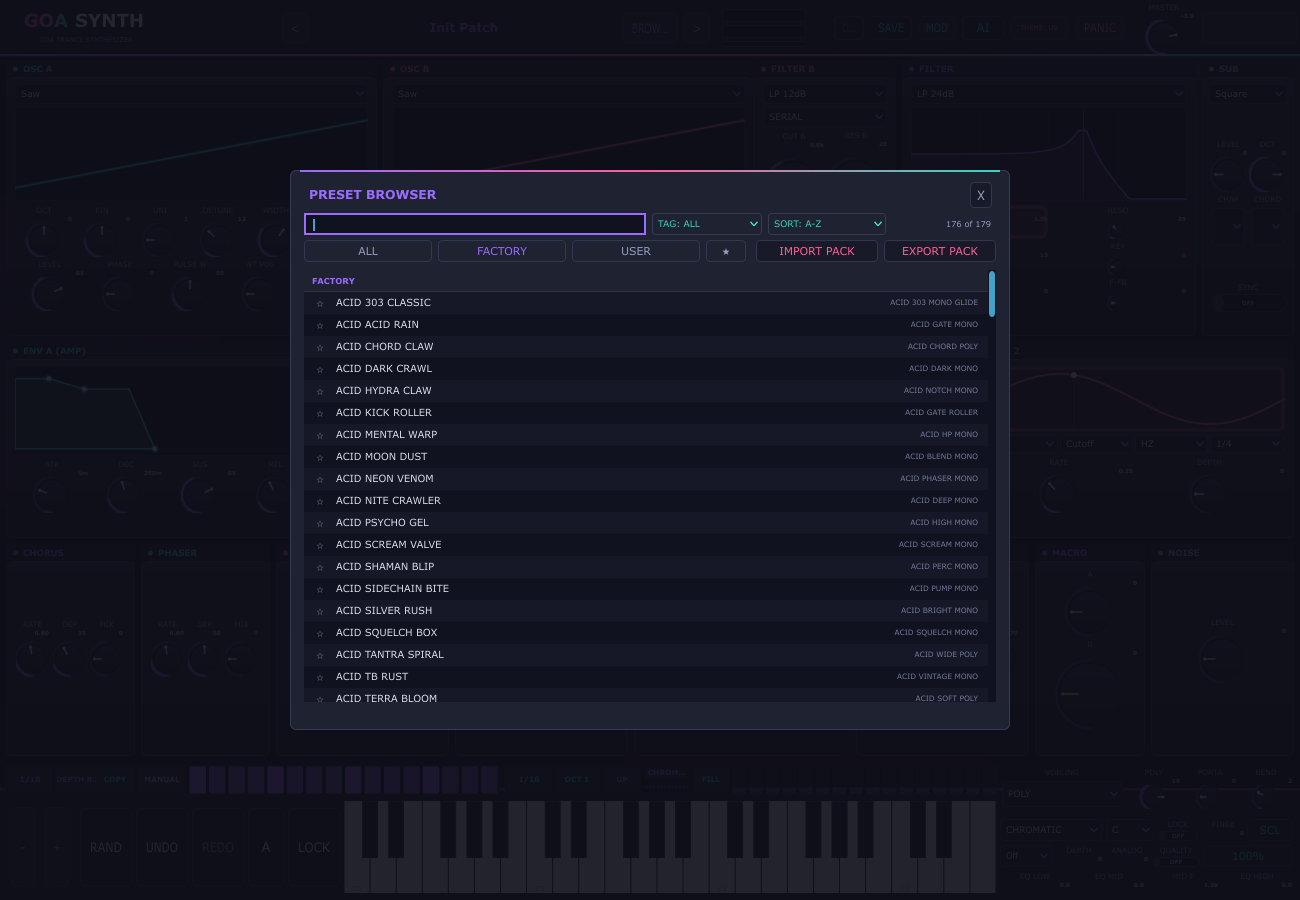
The header always shows the current patch name with < / > arrows for stepping through the bank, BROWSE opens a Serum-style overlay, and SAVE / DEL write or remove a user patch from the header itself:

  • ALL / FACTORY / USER folder tabs, plus a favourites star tab
  • Live search box that matches names and tags, and a TAG filter built from every tag in the bank
  • SORT by A-Z, Z-A, NEWEST or BANK ORDER, with a live "shown of total" count
  • Click a row to audition it with the browser still open; double-click to load and close
  • Star a patch to favourite it, click a tag to filter by it, right-click for load / rename / duplicate / delete / reveal
  • Grouped, zebra-striped list with the selected patch highlighted and up to three tags per entry
  • A teal SHARED badge on patches that live in the machine-wide bank
  • DEL in the header removes the selected user preset — factory patches are never touched

Saving your own

SAVE writes the complete patch — every parameter plus both drawn waves — as a .goapreset file in %APPDATA%/GoaSynth/Presets. The save dialog takes space-separated tags ("acid bass night") and a SHARED toggle: shared patches land in C:\Users\Public\Documents\GoaSynth and are visible to every account on the machine (a same-named preset in your own bank shadows the shared copy). AI-generated patches are one SAVE click away from being permanent.

The GoaSynth preset browser overlay: a search box, TAG and SORT dropdowns, a live preset count, ALL / FACTORY / USER tabs with a favourites star tab, and a grouped list of factory presets showing a star column and each patch's tags.
Browse, search, tag-filter — or move whole banks in and out.

Preset packs

EXPORT PACK and IMPORT PACK move whole banks in and out of the plugin. A pack is a .goapack file — a plain ZIP containing .goapreset files — so it's trivial to email, torrent or archive.

  • Export writes every patch in your merged bank (own presets, plus shared-bank patches and their tags) into a single pack, behind a native overwrite prompt.
  • Import merges non-destructively: existing presets are skipped, so a pack can never silently clobber what you have. New ones appear in the browser immediately.
  • Junk entries (READMEs, __MACOSX folders) are ignored, and zip paths are flattened on import so nested or hostile entries can't write outside the presets folder.
  • Packs round-trip: export → send → import → play.

Where things are stored

Your presets
%APPDATA%/GoaSynth/Presets
Shared bank
C:\Users\Public\Documents\GoaSynth
Preset file
.goapreset — all parameters + both user waves
Pack file
.goapack — ZIP of presets, safe to share
Session state
Full plugin state saved in the DAW project, including drawn waves and the active skin

Skins

Six faces, one engine

The THEME button cycles six complete skins and names the one you're on (UV → STEEL → WARM → NEON → PAPER → OLED), stored with the session and restored on reopen. Click one below to repaint this page.

The room breathes

Behind the panels an animated psychedelic swirl counter-rotates at about 30 fps — two pre-rendered log-spiral layers in the UV palette — and scale-pulses subtly with the smoothed output level, so the window moves with the music instead of sitting static.

Specifications

The boring details, all in one table

Format
VST3 (instrument / synth)
Platforms
Windows 64-bit, macOS, Linux
Plugin codes
Frbf / Gsyn
Polyphony
1–16 voices (POLY), MONO, LEGATO
Oscillators
2 + sub + noise, with a 1–7 voice unison stack detuning both oscillators together
Wavetables
8 drawable frames per oscillator, mip-mapped
Filters
2 × (LP12, LP24, HP12, BP12, NOTCH) with SERIAL / PARALLEL / SPLIT routing
Filter character
Pre-filter saturation (F-DRIVE) plus a one-sample resonant feedback path (F-FB)
Vowel filter
3-formant bank (AH · EH · EE · OH · OO), morph / resonance / mix, LFO-targetable
Envelopes
2 ADSR (amp + filter), velocity-sensitive
LFOs
2, seven destinations each (pitch, cutoff, PWM, volume, WT POS A/B, vowel morph), free or tempo-synced
Mod matrix
8 slots × 2 routing banks (A/B), bipolar amounts, per-slot curve (LIN/EXP/SIN) and lag
FX
Pump → Chorus → Phaser → OTT → Tempo delay → Reverb (with SHIM) → Master → Limiter
Sidechain pump
Host-synced output duck on 1/4, 1/8, 1/8T, 1/16 or 1/16T, with depth — no DAW sidechain routing needed
Sequencers
16-step trancegate (SQUARE / SMOOTH / SAW / TRIANGLE edge per step) + 16-step arp (velocity + gate length per step, UP/DOWN/PING-PONG/RANDOM/CONVERGE/STRUM), scale-quantised and phase-locked to the transport
Scales
9 tables — chromatic (off), minor, Phrygian, harmonic minor, Hungarian minor, double harmonic, Dorian, major, minor pentatonic — in any of 12 roots, with LOCK for live playing
Microtuning
Scala .scl files (2–64 degrees per octave, cents or ratios), plus ±100 cents fine tune (−32 = 432 Hz)
Presets
175 factory across 9 categories, unlimited user bank
Parameters
150+ host automatable, including every gate/arp step and matrix entry
MIDI
Note input required; mod wheel → cutoff, sustain pedal supported
Keyboard
Built-in on-screen keyboard with OCT− / OCT+ octave buttons and PANIC (all notes off)
AI engines
LOCAL (offline, default) · GEMINI · OPENAI-compatible · CUSTOM base URL (Ollama, LM Studio…)
Networking
Off unless you enable a cloud AI engine — then only your prompt and a parameter table go to the provider whose key you configured. No telemetry, no update checks, no accounts
Activation
Offline serial signed for your machine ID (20 hex characters). No account, no dongle, no server check; one serial per computer
Trial
24 hours, full features, stamped once per machine
Licence files
%APPDATA%/GoaSynth/License/license.txt, with the shared ledger and trial stamp under C:\Users\Public\Documents\GoaSynth\License
Analog & quality
Tape-style wow and flutter (ANALOG), and a QUALITY switch that renders the oscillator and filter path at 2× oversampling
Interface
Resizable window, 100 / 125 / 150 / 175 / 200 % zoom, remembered per user
Built with
JUCE 8, CMake 3.22+, C++17
Price
€15 one-time · VAT included where applicable
Licence
Buyers get a paid binary licence; the source stays public under AGPLv3
Install

From download to first acid line in two minutes

The download link is not live yet. The store that hosts the build is still being wired up, so there is nothing to grab on this page today: when it is ready the build comes with your purchase email, and the receipt carries the download page. The complete source is already public under the AGPLv3 if you would rather build it now — the steps at the bottom of this section show how.

  1. Grab the Windows build from the download page linked in your purchase email.
  2. Unzip and double-click the GoaSynth-Setup-<version>.exe installer, then choose where the plugin goes: Standard VST3 folder → C:\Program Files\Common Files\VST3\ (every DAW; Windows asks once for admin) — or pick a custom folder your DAW scans, no admin needed.
  3. Rescan plugins in your DAW, create an instrument track, and play. To play without a DAW, run the GoaSynth.exe the installer put next to the plugin.

Activate — offline, one serial

  1. Open GoaSynth in your DAW. Unlicensed it shows the activation screen with your MACHINE ID (20 characters, with a copy button), and the synth runs fully for 24 hours from first launch so you can try everything before paying.
  2. Send that ID to us — checkout has a field for it. We sign a serial against it and email you a .goalicense file.
  3. Double-click the file (Windows opens it with the bundled GoaSynth license helper), or press IMPORT on the activation screen and pick it — you can also drag the file straight onto the plugin window. You can paste the plain serial instead if you prefer — a file and its serial are interchangeable.
  4. That's it. The serial unlocks this computer and stays unlocked with no server to reach, no dongle and no login. Reinstalled Windows or changed hardware? The machine ID changes — email us, we release the old binding and issue a fresh serial, free.

Not a customer? Build it from source

The complete source is public under the AGPLv3, so anyone can compile GoaSynth without paying. Requires CMake 3.22+ and MSVC 2022 (Windows), Xcode (macOS) or a g++/clang toolchain (Linux). JUCE is fetched automatically by CMake.

cmake -B build -G "Visual Studio 17 2022" -A x64 -DCMAKE_POLICY_VERSION_MINIMUM=3.5
cmake --build build --config Release --target GoaSynth_VST3 --parallel

The plugin lands at build/GoaSynth_artefacts/Release/VST3/GoaSynth.vst3. On macOS/Linux use your platform's generator instead of the Visual Studio one. A RoundTripTest target checks that every parameter and both drawn waves serialise and reload identically. The licence gate ships with that source: Source/LicenseKeys.h is generated by GoaSynthKeygen --init, so a fresh checkout carries a placeholder header that rejects every serial — building it yourself means creating your own keypair once and rebuilding. The AGPLv3 allows exactly that; the €15 buys the finished builds, the support and the updates.

Activation is offline, and it binds to one computer at a time. A serial is an RSA signature over your machine ID, so it never phones home — but it also can't be passed around, and a Windows reinstall or a hardware change moves the ID. Email us and we release the old binding and issue a fresh serial, free; you are never locked out of hardware you own.

Contributing

UI conventions

The editor keeps its hover info and modulation indicators uniform on purpose. If you touch Source/PluginEditor, these are the rules new controls follow.

Tooltips

Every interactive control has hover text, displayed by the single TooltipWindow the editor owns — without it every setTooltip() is a silent no-op. Knobs and toggles build theirs automatically: parameter name + live value in engine units (Cutoff (Hz) — 1500 Hz, Attack — 0.01 s, RESO — 25 %; toggles show ON/OFF). The unit map is liveValueText() in Source/PluginEditor.cpp; give any new parameter a branch there, or the OverlayTest unit sweep fails and names the id. Text is rebuilt every paint, so values track drags, host automation and preset loads while you hover — never cache tooltip strings. Hand-written tooltips follow the house style: what it is, an em dash, then the gestures.

A CUTOFF knob with a velocity mod dot and its 1.5k live readout

Mod dots & pick-to-assign

A knob targeted by an active mod-matrix slot wears small dots in its top-right corner — one per source slot (max 3): teal for LFO 1, magenta for LFO 2, accent for envelopes, dim for velocity/modwheel. Each dot pulses with the live source value × amount, and depth past ±0.6 adds a ring. Hovering the knob lists its routings (MOD 2: LFO 1 → CUTOFF (+40)). Dots refresh on matrix edits, overlay open and preset loads — any new code path that changes slots must call goaui::repaintCtlPaints().

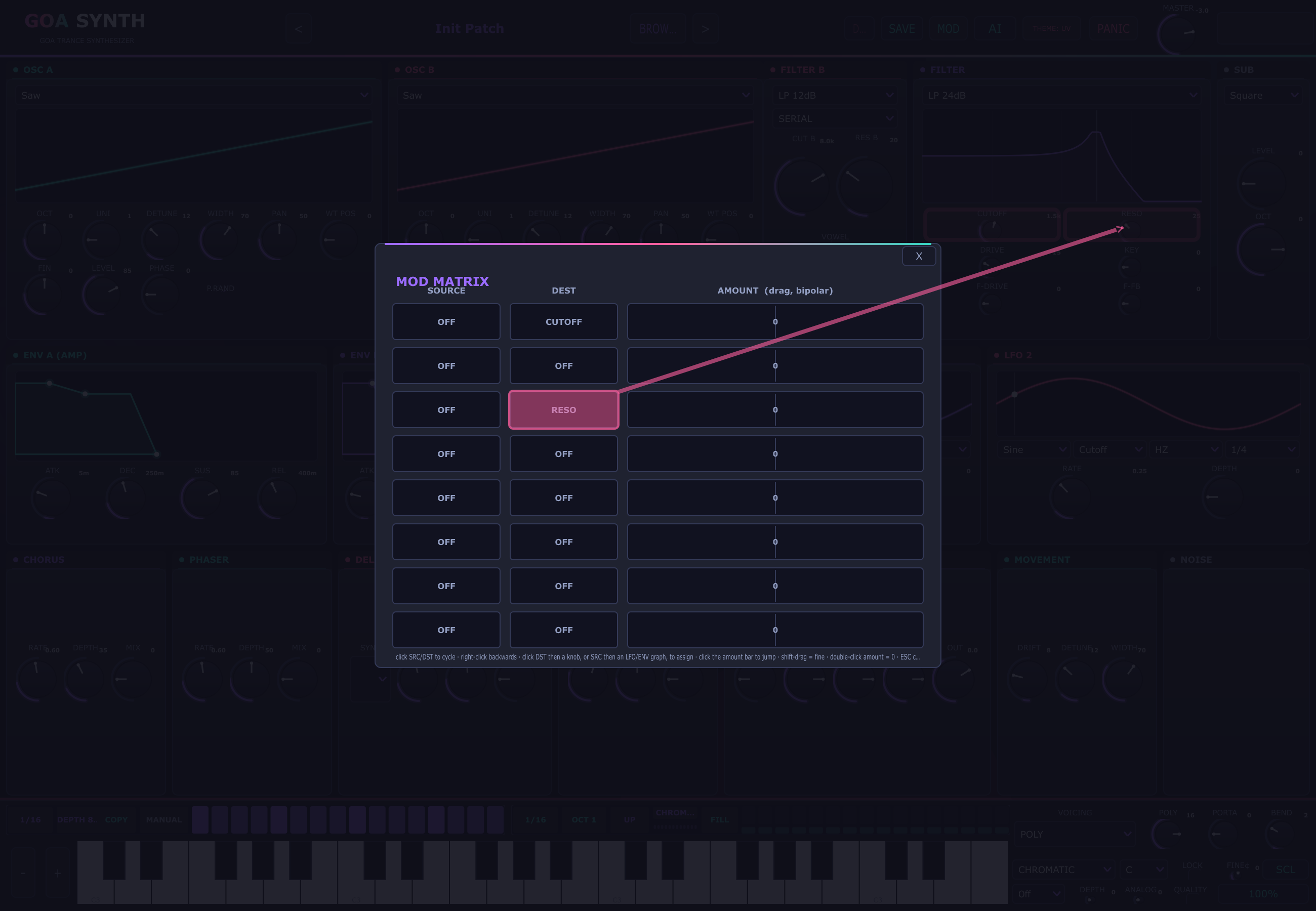
The matrix itself routes by pointing: click a DST cell then a knob, or a SRC cell then an LFO/ENV graph; ESC or a re-click cancels, and the just-routed cell flashes inside the card with a brief arrow pointing at the clicked control to confirm. New routable controls must expose their parameter ids (Ctl::paramId, LfoGraph::rateParamId, EnvGraph::attackParamId()).

Pick-to-assign: the just-routed DST cell flashing, with a brief arrow pointing at the target knob

Try it

Play the trancegate, right here

A tiny slice of the plugin running in your browser: four of the gate shapes the sequencer ships with, clicking steps just like the real strip. No audio files, no samples — every note is synthesised live in your browser the way the synth does it.

Interactive demo

The top four rows are the gate shapes (UPLIFT, OFF-BEAT, ROLLER, 16THS) — click any cell to toggle it. The bottom row drives the arp sequence through the scale quantizer. Headphones recommended; the real plugin adds the supersaw, the filter and the rest of the FX chain.

Patch of the week

A preset from the shipped bank, refreshed by hand with each release. Load it from the PRESETS browser.

This week
BASS PSY ROLLER — the rolling full-on bass: a saw an octave down with a sub under it, driven into the 24 dB ladder at 380 Hz and worked by the filter envelope, mono with a 20 ms glide
Hear it
Load the patch, set PUMP to 1/8 and hold a low E — the bass breathes on its own
Next week
LEAD SUPERSAW — two saws 12 cents apart stacked into seven detuned voices and spread wide, through a 12 dB lowpass with chorus and a quarter-note delay, rendered with QUALITY on

All 175 patches ship inside the plugin — browse, randomise from them, or overwrite with your own.

Licence

Paid builds, public source

Two things are true at once: the binaries cost €15, and the code is open. That's intentional — and no part of the licence locks your music or your copy of the plugin.

What your purchase covers

Paying for GoaSynth buys a personal licence to the built plugin: use it in commercial releases, live sets, remixes, sample packs and client work, forever. There are no per-track fees, no royalties, and nothing in the licence claims any rights over the music you make with it.

Seats
Up to three machines you personally use — studio, laptop, spare. One serial per computer, issued free on request
Bands & studios
One licence per user; a second seat for a bandmate is a second licence
Updates
Free for the whole 1.x line, delivered by the same download link
Refunds
14 days from purchase, no questions asked; the serial is revoked with it
Activation
Offline serial signed for your machine ID. No account, no dongle, no server check — and moving to new hardware costs nothing
Trial
24 hours of the full plugin before you pay anything

Why the source is still public

The code is released under the GNU Affero General Public License v3.0. Anyone may read it, modify it, and compile a working plugin for free — including people who bought a licence. The AGPL also lets you redistribute it, as long as the corresponding source goes with it.

So the €15 is not a padlock on the software; it's the price of not building it yourself. You're paying for compiled, tested builds for three platforms, the 175-preset bank, updates and support — and in exchange you get a plugin you can inspect, audit and keep, with no subscription that can expire on you.

JUCE 8
Used under its AGPLv3 option
VST3 interface code
Used under Steinberg's GPLv3 dual licence
Your music
100% yours — nothing here claims rights over your output
Your data
The plugin keeps your machine ID, serial and trial stamp on your own disk and sends nothing anywhere. A cloud AI engine is off until you configure your own key, and then only your prompt goes to the provider you chose

VST® is a trademark of Steinberg Media Technologies GmbH, registered in Europe and other countries. The Licence Agreement and the Terms of Sale are provided with your order confirmation, and are on this site in full before you buy.

FAQ

Questions, answered

It costs €15 — why is the source on GitHub for free?

Because you'd rather make music than compile code. GoaSynth's source is public under the AGPLv3, so yes: you can clone it, install CMake and build the plugin yourself for nothing, and that's a deliberate choice rather than a loophole. The €15 buys the finished product — builds for Windows, macOS and Linux, the tested 175-preset bank, every update in the 1.x line, and someone to email when a DAW misbehaves. Most people take the second option; both are legitimate.

What exactly do I get when I buy?

The download page for the Windows, macOS and Linux VST3 builds, the licence terms, and a licence serial signed for the machine ID you gave at checkout — delivered as a .goalicense file you double-click or IMPORT. There's no account to create and no server to reach: activation is offline and permanent. Keep the receipt email, since it stays your re-download link and your order reference for support.

Can I try it before paying?

Yes — install the build and GoaSynth runs fully featured for 24 hours from first launch: the whole sound engine, both filters, the FX chain, the trancegate, the arp, the AI designer and all 175 presets. The header shows a TRIAL 23 h 59 m badge, and clicking it opens the activation screen with your machine ID ready to copy. Once the 24 hours are up, instances render silence until a serial is entered.

How many computers can I install it on?

Three machines that you personally use — studio desktop, laptop, spare. Each needs its own serial, because a serial is signed against that computer's machine ID: checkout asks for one ID, and send us the other two afterwards and we'll issue those serials free. One licence covers one person, so bandmates and studio partners each need their own. Nothing is ever checked online — the binding lives in a ledger file on your machine, not on a server.

What if it doesn't work out?

Email within 14 days of purchase and you get a full refund, no questions asked — you don't have to justify it or prove anything, and having already used the plugin doesn't disqualify you. We'd rather have a clean refund than a grudging customer. The details are in the Refund Policy.

Does the AI patch designer need the internet?

No. The default LOCAL engine is a rule-based generator that runs entirely inside the plugin — type, generate, save, offline. If you want a real language model, the AI ENGINE button can point the designer at Gemini, an OpenAI-compatible endpoint or your own base URL (Ollama, LM Studio, OpenRouter) using a key you supply. That key is kept locally in %APPDATA%/GoaSynth/ai.txt and sent only to the provider you chose; your presets, projects and audio are never part of the request, and switching back to LOCAL makes the plugin fully offline again.

Will it run on my machine?

It's a standard VST3 instrument for Windows, macOS and Linux, built with JUCE 8. Because the oscillators and wavetables are band-limited and the OTT is a true bypass at depth 0, the engine stays light even with unison and long reverb tails — but a 7-voice unison on both oscillators, 16 voices of polyphony, full OTT and QUALITY (2× oversampling) on is the heaviest case.

Where do my presets live, and can I share them?

Your bank is in %APPDATA%/GoaSynth/Presets. Use EXPORT PACK to write a .goapack ZIP of your whole bank and send it to anyone; they hit IMPORT PACK and it merges in without overwriting their own patches. There's also a machine-wide shared bank at C:\Users\Public\Documents\GoaSynth if you share one studio PC.

What data do you collect?

From the plugin: nothing. It keeps a handful of small files on your own disk — your preset bank and settings, the serial you activated with, a trial timestamp, your AI key if you add one, a copy of any Scala tuning you load, and a local memory of the AI briefs and patches you chose to keep — and sends nothing anywhere unless you switch on a cloud AI engine. Because a licence is signed for a machine, the store's checkout asks for your machine ID alongside the usual name, email and billing country; the Privacy Policy explains exactly what that ID is, where it goes and how long it is kept. This website sets no cookies and runs no analytics.

I reinstalled Windows (or moved to a new PC) and it says unlicensed.

The machine ID is a fingerprint of your hardware and user account, so a reinstall or a new machine produces a new one — and the old serial correctly refuses to activate there. That is the same property that stops keys from being passed around. Email us with your order reference and we release the old binding in the ledger and issue a fresh serial for the new ID at no charge; there is no limit on how often you need that.

Can I release commercial tracks made with it?

Yes, and that's included in the €15. Releases, live sets, remixes, sample packs and client work made with GoaSynth are entirely yours — no royalties, no credit required, no per-track fee. The licence covers the software, never your music.

Does the trancegate actually stay in time?

Yes — both the gate and the arp are sample-accurate and phase-locked to the host transport bar. Drop into the middle of a bar and they're already on the correct step instead of restarting.

Can I use my own scales or a non-standard tuning?

Yes. SCALE and ROOT quantise the arp — and your live playing, with LOCK on — into nine built-in tables, from Phrygian and harmonic minor to minor pentatonic. For anything past that, SCL loads a Scala .scl file: just intonation, 19- or 31-tone equal temperaments, gamelan-style per-octave tables, up to 64 degrees. FINE¢ covers the common cases on its own, since −32 cents is a 432 Hz reference. The loaded tuning is copied into your settings and comes back automatically next session.

Do I need to set up sidechain routing in my DAW?

No. The built-in PUMP ducks the output on a beat division you pick — 1/4, 1/8, 1/8T, 1/16 or 1/16T — locked to the host transport, with DEPTH setting how deep it goes. Nothing to route, no kick track to trigger from, no extra mixer channel, and it works in any host that reports tempo. Sync at OFF or depth at zero is a true bypass.

Why "GoaSynth" and not "VST"?

The plugin is a VST3. Steinberg's usage guidelines say the word VST shouldn't appear in a product name, so the name stays clean and the format is described separately — with the trademark attribution above.

Make something that sounds like midday at Ozora.

One payment of €15. Three platforms, 175 presets, every update in the 1.x line, and no subscription to forget about.

24-hour trial · 14-day refund · offline activation · no account · source published under the AGPLv3